ceoelection.bihar.gov.in : TC/GC Electoral Search
Organisation : CEO Bihar
Facility Name : TC/GC Electoral Search
State : Bihar
Website : https://ceoelection.bihar.gov.in/index.html
How To Search TC/GC Electoral in Bihar?
You can search the Teachers’ Constituency (TC) and Graduates’ Constituency (GC) Electoral Roll in Bihar online through the official portal of the Chief Electoral Officer (CEO), Bihar.
Steps:
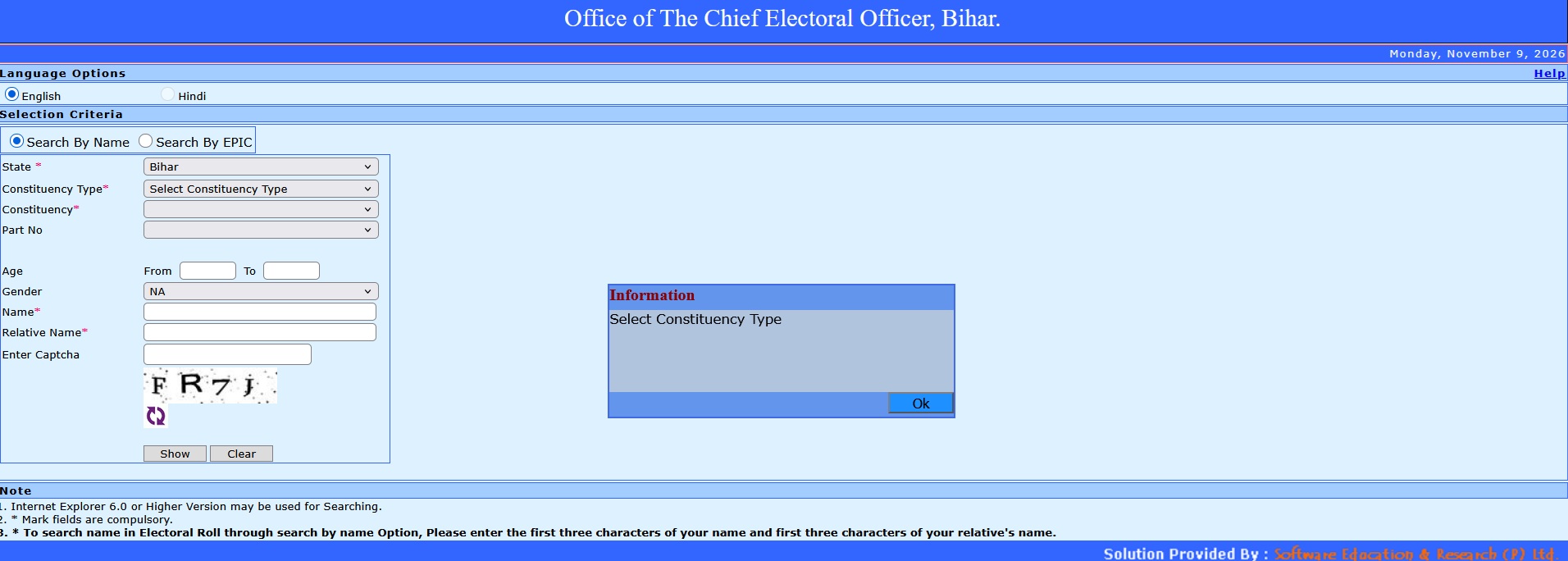
** Go directly to the official CEO Bihar TC/GC Electoral Search Portal https://ceo.bihar.gov.in/tcgcelectorsearch/
** Choose your preferred search tab at the top: Search By Name or Search By EPIC (Voter ID card number).
Fill in the required parameters:
** State: Selected as Bihar by default.
** Constituency Type: Select either GC (Graduates’ Constituency) or TC (Teachers’ Constituency) from the dropdown.
** Constituency: Select your specific constituency area.
** Filters (Optional but recommended): You can select the Part Number (Polling Station), House Number, Age, and Gender to narrow down results faster.
Enter the identity details:
** If searching by Name: Enter at least the first three characters of your name and the first three characters of your relative’s name.
** If searching by EPIC: Enter your Voter ID card number.
** Enter the Captcha code shown on the screen and click Search.
Note:
1. Internet Explorer 6.0 or Higher Version may be used for Searching.
2. Mark fields are compulsory.
3. To search name in Electoral Roll through search by name Option, Please enter the first three characters of your name and first three characters of your relative’s name.
About CEO Bihar TC/GC Electoral Search Portal
The CEO Bihar TC/GC Electoral Search Portal is an online tool provided by the Office of the Chief Electoral Officer, Bihar, designed to let voters search for their names in the electoral rolls for Teacher Constituencies (TC) and Graduate Constituencies (GC).
Key Details & Features
** Purpose: Allows teachers and graduates registered in specific MLC (Member of Legislative Council) constituencies to verify their enrollment status in the electoral roll. ceo.bihar.gov.in
** Search Options: You can search by entering criteria such as State (Bihar), Constituency Type (GC or TC), Constituency name, Part No. (Polling Station), House No., Age, Gender, Name, and Relative’s Name. ceo.bihar.gov.in
** Name Matching Rule: To search by name, you typically enter the first three characters of your name and the first three characters of your relative’s name to minimize spelling discrepancies. ceo.bihar.gov.in
** Forms & Registration Context: The portal links with special registration and claim processes (such as Form 18 for Graduate Constituencies and Form 19 for Teacher Constituencies). ceo.bihar.gov.in